
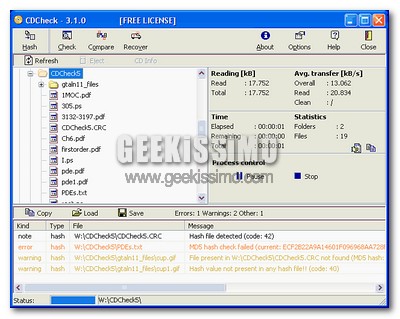
Come ogni buon geek sa alla perfezione, per evitare situazioni spiacevoli, molto spiacevoli, legate alla perdita di tutti i dati più preziosi conservati nel proprio hard disk (che, considerando il fatto che la musica si mette subito sull’iPod, i video su DVD, le mail su “Gmail”, le foto su “Flickr”, ed i documenti in una pennetta USB, spesso sono i filmetti zozzi), è necessario effettuare con una certa frequenza delle copie di backup.
Questo prevede – nella maggior parte dei casi – la masterizzazione dei file su DVD che, come tutti noi ben sappiamo (purtroppo), sono tutt’altro che eterni. Ecco quindi nascere l’esigenza di avere un software come CD Check, in grado di controllare e recuperare dati da dischi danneggiati.
Basta scaricare il programma, installarlo, effettuare la registrazione gratuita per eliminare il limite di 30 giorni (qualcuno ha detto di utilizzare un indirizzo e-mail temporaneo?) ed il gioco è fatto: avrete a vostra disposizione uno strumento molto efficace, tramite il quale controllare lo stato di CD e DVD in un batter d’occhio e, se necessario, estrapolare dati da supporti danneggiati (ovviamente i miracoli non sono previsti… si spera nella prossima release!).
CD Check è compatibile con tutte le versioni di Windows, dal ’95 fino a Vista, è abbastanza leggero ed ha un grado di efficacia davvero invidiabile.
Provatelo e diteci cosa ne pensate.
Via | gHacks
Leggi anche:
 SizeMe, verificare quanti CD e DVD occorrono per masterizzare i propri file ottimizzando lo spazio disponibile
 QUpload to Rapidshare, come effettuare l’upload dei file su Rapidshare dal Desktop
 9 screensaver utili… o quasi!
 I migliori software gratuiti per recuperare i dati
 Download dei 4 screensaver più belli di Windows Vista
I commenti sono chiusi.